
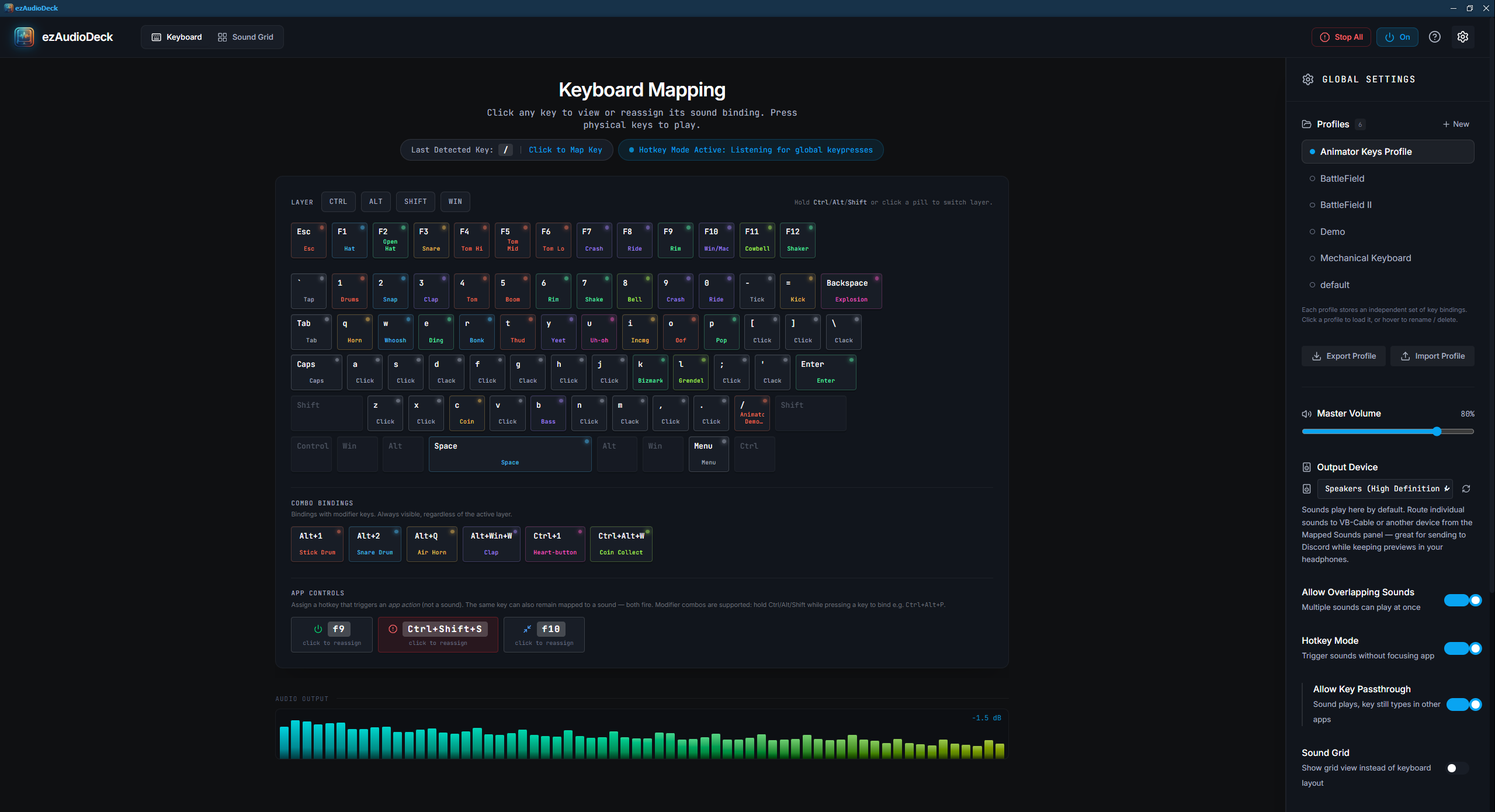
Map keyboard keys to sounds, stream effects, and more — works even when minimized.
ezAudioDeck is a Windows audio trigger pad that turns your keyboard into a professional sound effects board. Bind any key to any sound — single keys, key combinations, or even your Stream Deck. Generate custom sound effects on-the-fly using AI from Eleven Labs. Import/export complete sound packs and share with friends. Perfect for streamers, podcasters, content creators, and musicians who need instant, reliable audio control. What makes ezAudioDeck really special is how elegantly it handles the exporting. By compressing the settings and the raw audio data into a single, lightweight binary file (.eadp or .eadmp), you get the sharing simplicity of a massive commercial app like Stream Deck without the Stream Deck price tag and without needing to manage separate folders of MP3s!
See FAQ tab for questions you might have.
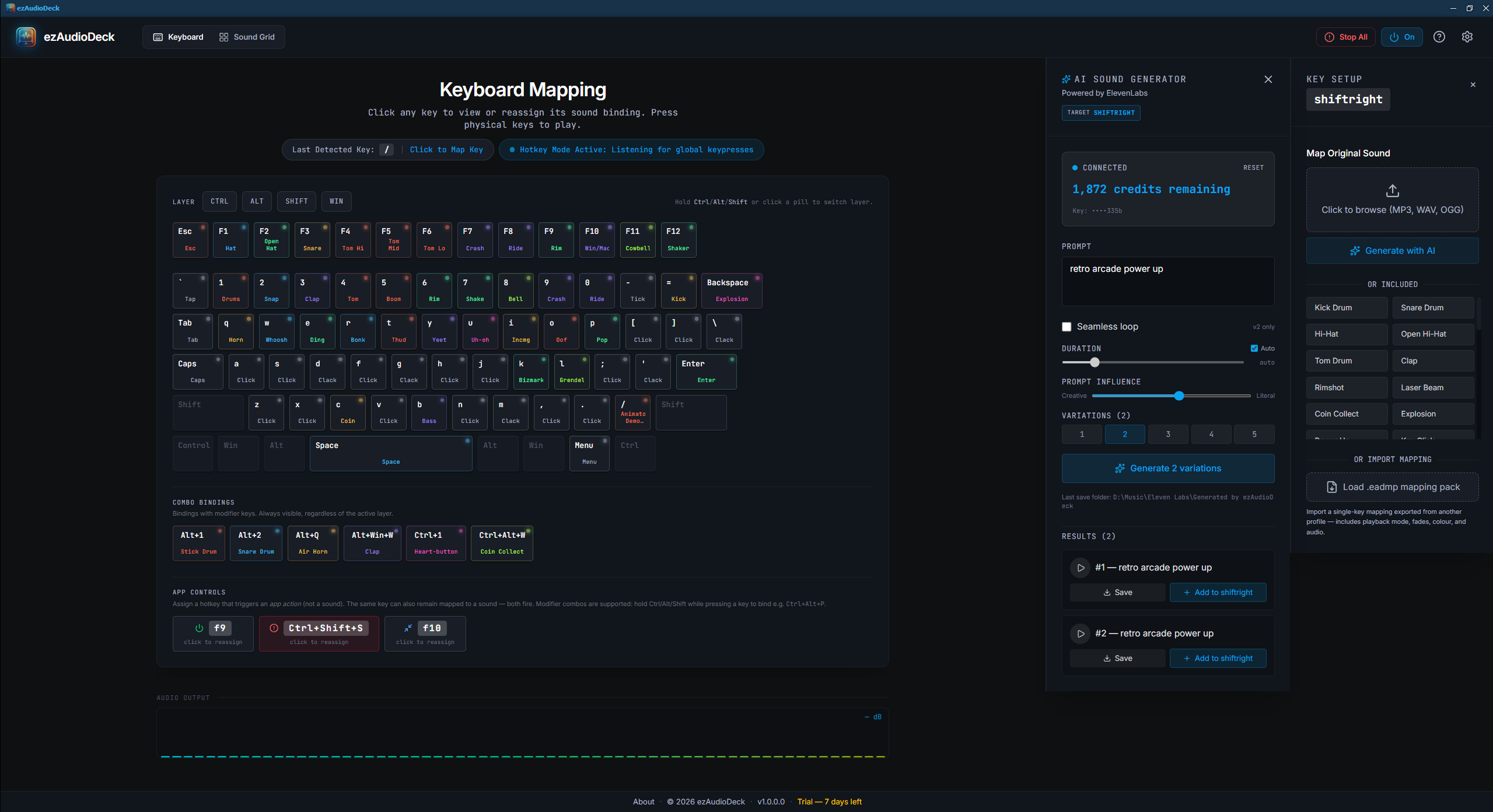
.eadmp filesStop searching stock libraries. Use ezAudioDeck's built-in AI sound generator to create custom effects on-demand:
Generate variations, preview, and map them to keys in seconds.
.eadmp packsWindows 10 or 11, with the Microsoft Edge WebView2 runtime (already installed on most modern Windows systems).
ezAudioDeck runs fully offline. Internet is only needed for ElevenLabs AI sound generation.
This is a perpetual license with a limited maintenance period (often called a "Software Maintenance" or "Upgrade Subscription" model).
Key features of this model include:
Ownership: You own that specific version of the software forever.
Maintenance: You get free minor/major updates for 1-year. After 1-year, to access new releases you will need to renew your license at a 40% discount inside your member dashboard.
You will have 15 days to evaluate ezAudioDeck for free before you purchase a license code.
When you open ezAudioDeck you are presented with the System ID, use the copy button to copy your system ID for checkout.
If you purchase using PayPal at check-out, you should receive your registration code immediately in the member dashboard and by email after purchase . If you do not receive your key by email, look in your spam folder. You can also find your key inside the member area dashboard and see the status of your purchase 24/7. If you purchased using Gumroad, it is the same but sometimes can be delayed a few moments while Gumroad completes the purchase and pings our system.
No, ezAudioDeck runs fully offline. The Internet is only needed for ElevenLabs AI sound generation.
Safe for:
Yes, they absolutely do!
When you export a profile (the .eadp file), the app finds every single custom sound mapped to any key in that profile, bundles all the audio files together, and packs them straight into the profile file.
This means a Profile Pack is completely self-contained. You can send a profile file to a friend (or to a different computer), and when they import it, it will automatically unpack and load all the custom sounds exactly where you placed them on the keyboard!
In fact, ezAudioDeck doesn't just link to external sounds on your hard drive. When you drag and drop an external sound file (like an MP3 or WAV) onto a key, the app actually reads that file and makes an internal copy of it.
Because of this, when you export a profile, all those external sounds you added are physically bundled inside the .eadp file. If you move your original MP3 files, delete them, or send the profile to someone else who doesn't have those files on their computer, the sounds will still play perfectly because the profile brings the audio data with it!
v1.00 - Initial Release
Your review goes here
1.00
Jul 08, 2026 - 11:51 PM
Apr 20, 2026 - 02:07 PM
Windows




No Reviews